
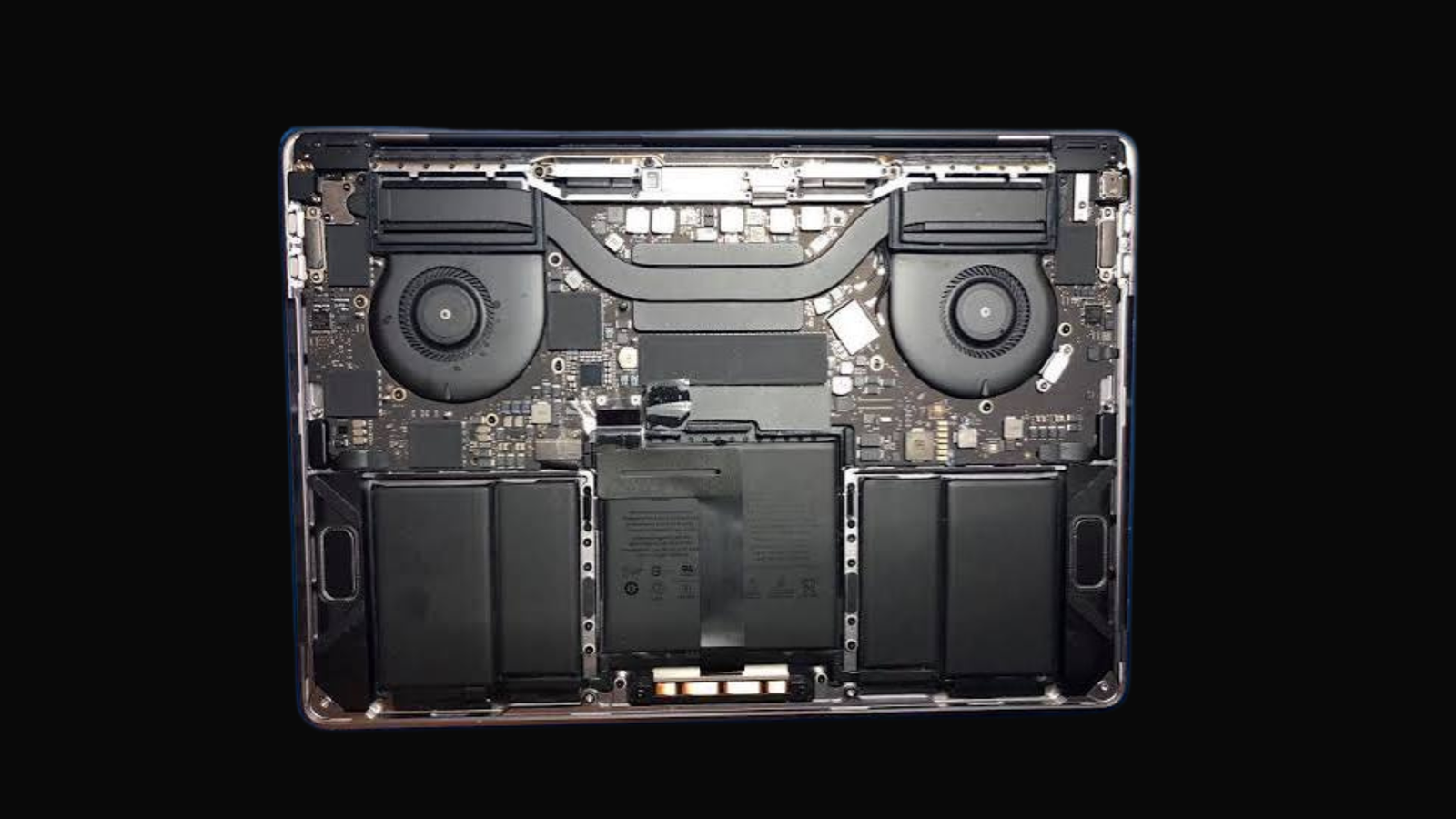

Need a MacBook liquid damage fix in Kampala? When water, tea, coffee, juice, or soda spills on your MacBook, moisture inside can cause corrosion, short circuits, charging faults, keyboard failure, screen problems, or logic-board damage. MicroStar Andy provides expert MacBook repair at Majestic Plaza L5-07, William Street, Kampala.
Even when your MacBook seems fine after a spill, moisture inside can cause serious problems later. Bring in your MacBook Air or MacBook Pro as soon as possible for a proper check and a clear recommendation on the right repair path.
Macbook Liquid Damage Fix Kampala: What to Do Right After a Spill
Fast action can reduce the risk of extra damage. If liquid spills on your MacBook, do the following:
- Turn it off right away if it is on.
- Unplug the charger and all USB-C devices, drives, headphones, and accessories.
- Do not try to charge it. Power and liquid together make the damage worse.
- Do not keep restarting it to see if it still works.
- Do not use a hair dryer, heat, rice, or direct sun. These do not fix internal corrosion and can make things worse.
- Bring it to MicroStar Andy right away for a proper check.
Do not think a MacBook is safe just because it turns on after a spill. Corrosion can build up and cau
Macbook Liquid Damage Fix Kampala: MacBook Water Damage Repair in Kampala
Water Damage Repair in Kampala
MicroStar Andy is a local Apple Mac repair shop in Kampala. We work on MacBook Air, MacBook Pro, iMac, Mac mini, Mac Studio, and Mac Pro systems.
For a liquid-damaged MacBook, we start with a careful check. We look at the affected areas, find visible corrosion or broken parts, and explain the best fix before we start work. For more than just liquid damage, see our Mac repair services in Kampala.
Signs of Liquid Damage in a MacBook
Liquid damage does not always show up right away. Your MacBook may work for a while, then start showing one or more of these problems:
- MacBook does not turn on
- MacBook will not charge or charges sometimes
- Keyboard keys stop working, stick, repeat, or type wrong letters
- Trackpad stops working or clicks by itself
- Screen flickers, gets dim, shows lines, or stays black
- MacBook shuts down on its own
- Fans run loud or the MacBook gets too hot
- USB-C ports, speakers, camera, Wi-Fi, or Bluetooth stop working
- MacBook is stuck on the Apple logo
- Battery drains fast or the MacBook acts strange
If you see smoke, smell burning, feel extreme heat, or see battery swelling, stop using the MacBook now and do not plug it in.
Why Liquid Damage Gets Worse Over Time
A liquid spill can affect more than the keyboard. Modern MacBooks have parts packed close together. Liquid can travel from the keyboard to the battery, trackpad, screen connectors, charging circuits, ports, storage, and logic board.
When moisture stays inside, it creates corrosion. Corrosion slowly damages electrical contacts and can cause intermittent faults that get worse over time. That is why early assessment is better than waiting to see if the MacBook dries out.
The sooner the MacBook is checked, the better the chance of limiting more damage and protecting your files.
MacBook Keyboard Problems After a Spill
The keyboard is often the first part hit by liquid. You may find that one key stops working, several keys type wrong letters, letters repeat, keys feel sticky, or the whole keyboard and trackpad stop responding.
MicroStar Andy provides MacBook keyboard replacement in Kampala when a liquid-damaged keyboard needs professional help. The right fix depends on the MacBook model and whether the spill only hit the keyboard or reached deeper parts.
Do not remove MacBook keys or open the device yourself. Modern MacBooks use delicate clips, cables, and parts that can break easily.
Our Liquid Damage Check Process
When you bring your MacBook to MicroStar Andy, the process is simple:
- Tell us what happened. Let us know what liquid was involved, when the spill happened, and whether the MacBook was on or charging.
- Get a diagnostic check. We look at the MacBook for likely liquid damage and broken parts.
- Get a clear plan. We tell you what we found and the best fix for your device.
- Approve the work. We only start after you understand and approve the plan.
- Test before pickup. We test the fixed parts before you collect your MacBook.
We handle your Mac and data with care. But regular backups are the best way to protect important files before any unexpected hardware failure.
Why Choose MicroStar Andy?
MicroStar Andy is a local Apple Mac repair expert in Kampala. We provide clear checks, repair work, upgrades, macOS help, and data recovery for Apple Mac computers.
Our shop is at Majestic Plaza L5-7, William Street, Kampala. We are close to Kampala Road and easy to reach from the city centre. We serve Mac users from Nakasero, Kololo, Makerere, Ntinda, Bugolobi, Muyenga, Kabalagala, Kansanga, and nearby areas. Learn more about our team at About MicroStar Andy or read our contact page.
Frequently Asked Questions
Can a liquid-damaged MacBook be fixed?
In many cases, yes. The fix depends on the type of liquid, how long it stayed inside, the broken parts, and the condition of the MacBook. A quick check gives the best chance of limiting damage.
Should I put a wet MacBook in rice?
No. Rice does not remove moisture or corrosion from inside a MacBook. Do not use rice, heat, or a hair dryer. Turn off the MacBook, unplug it, and bring it in for a proper check.
Can I charge my MacBook after a spill?
No. Do not charge or turn on a MacBook after liquid exposure. Power can cause more short circuits and make the damage worse.
Why is my MacBook keyboard not working after water damage?
Liquid can break keyboard parts and may also hurt internal cables, the trackpad, battery, or logic board. A proper check finds the cause.
Can you recover files from a liquid-damaged MacBook?
Data recovery may be possible depending on the MacBook model, storage condition, encryption, and how bad the damage is. Bring the MacBook in fast and tell us that data recovery matters to you.
What you get with the service
| Item | Detail |
|---|---|
| Diagnostic | Free 21-point inspection at Majestic Plaza L5-07 |
| Turnaround | Most MacBook and iMac jobs done in 24-48 hours |
| Warranty | 3-month warranty on parts and labour |
| Location | Majestic Plaza, Level 5, Shop 07, Kampala |
| Since | Serving Kampala since 2004 |
Written by the MicroStar Andy team – Mac repair specialists serving Kampala since 2004.

[…] dry and inspect same day at Majestic Plaza L5-07. See liquid damage fix, technicians guide, MacBook Pro, and contact or reserve via […]